The Pros and Cons of Headless Architecture | by Viacheslav Lushchinskiy | ELCA IT | Medium
Sign up
Get app
Sign up

ELCA IT
·
Follow publication

We are a team of more than 2300 IT experts. ELCA is a leader in IT service in Switzerland with offices in Lausanne, Zurich, Geneva, Bâle, and Bern. ELCA is also present in Granada, Hô Chi Minh City, and Mauritius
Follow publication
Featured
The Pros and Cons of Headless Architecture

Follow
8 min read
·
Aug 15, 2023
50
2
Share
What It Is and How It Works
Headless architecture is a popular concept of building web applications that are based on a content management system (CMS) where the CMS is used solely as a source of data, while the user interface is created separately by developers. The term “headless” refers to the decoupling of the frontend (or “head”) of a website or application from its backend (or “body”).
Press enter or click to view image in full size
Traditional CMS systems typically have an integrated frontend, where developers use the CMS’s built-in templates and themes to create the user interface. This approach has its advantages, but it also limits developers in terms of design and functionality. As web development technologies have evolved, developers have sought ways to separate the frontend from the backend, giving them greater control and flexibility.
Even though the term Headless architecture in the context of CMS has been known for some time, it started gaining popularity just recently, when, from the one hand, more and more CMS introduced the capability of providing its data via REST API and, from the other hand, the gap between CMS driven UI and JavaScript driven UI became more and more obvious in terms of performance and usability.
Press enter or click to view image in full size
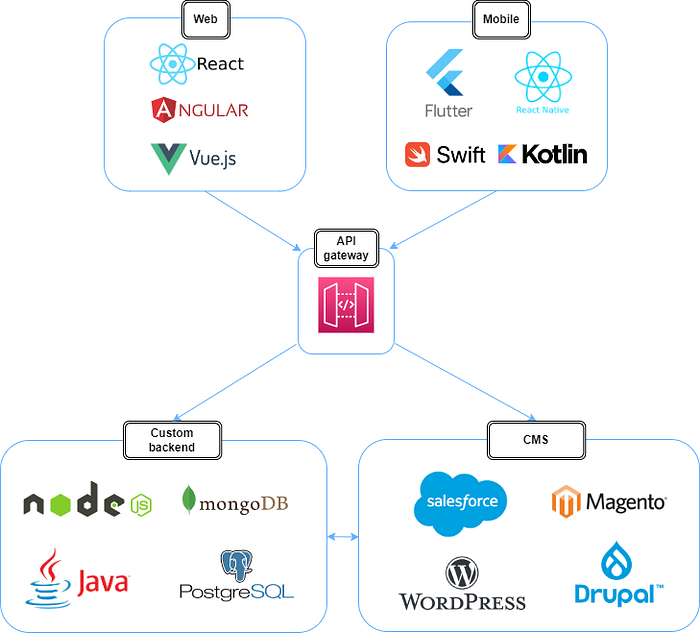
Solution design based on headless architecture
Headless Architecture Benefits
By decoupling the frontend from the backend, developers can use any technology they want to create the user interface, including popular frontend frameworks like React, Angular, and Vue. This allows developers to create custom, high-performance user interfaces that are optimized for the specific needs of their application.
At the same time developers can save significant time by using an existing backend and database solution especially for their e-commerce platform that CMS provides. Developing a backend for an e-commerce platform can be a complex task that requires a range of skills, including security, database configuration and performance management, caching. etc. From the other hand the backend functionality for many online shops is similar and can be efficiently handled by using any modern CMS. Some CMS solutions, usually open-sourced ones can be customized should their REST API endpoints happen to have some limitations.
All CMS products offer user management, authentication, user profiling and other common features that most of the project would require. E-commerce solutions also provide robust REST API support for managing transactions and customer data. For example, the Salesforce Commerce Cloud API provides endpoints for managing products, prices, orders, promotions, and customer data, as well as supporting integrations with third-party payment gateways and shipping providers. The full list of Salesforce REST API endpoint for building headless e-commerce solutions can be found here.
It is quite extensive and can satisfy the needs of many customers thinking about going online with their products.
The decoupling of the frontend and backend allows developers also to easily extend existing solutions to new devices and platforms, as they can create new frontends that utilize the same backend logic and data management layer. For example, a web application built using headless architecture can be extended to mobile devices by developing a mobile app that uses the same backend, reducing development time and cost.
Headless architecture can be also used effectively with a microservices approach because it enables the development of independent frontend and backend services that can communicate through APIs. This approach allows for greater flexibility and scalability, as each service can be developed, deployed, and scaled independently of the others. Additionally, a headless architecture with microservices can simplify maintenance and updates by making it easier to isolate and update individual services without affecting the entire system. For example, the e-commerce platform can work with product catalog using one CMS and fulfilling orders and shipments using the other CMS or custom backend while keeping frontend user experience smooth and uniform.
Headless architecture also drives the agile development practices in a way that it enables teams to work in parallel on different aspects of a project. With a headless architecture, frontend and backend developers can work independently of each other, which can speed up the development process and allow teams to iterate and improve the system faster. It can also help teams respond more quickly to changing requirements and user needs. By separating the frontend and backend layers, teams can make changes to one without affecting the other, making it easier to adjust the system as needed.
Overall, headless approach allows to build professionally looking website as if they are developed by the professional software developers but at the same time to save cost and time by focusing on the frontend part only and leaving backend to the respective CMS
Headless Architecture Challenges
While headless architecture has many benefits, it also presents some challenges. One of the main challenges is that it requires more development work to create the user interface. Developers need to create custom code that can communicate with the CMS’s API to retrieve and display content. This can add extra time and complexity to the development process.
It requires more technical expertise of the software development team. Since developers need to create the user interface from scratch, they need to have a deep understanding of frontend technologies, such as JavaScript, HTML, and CSS as well as a gut grasp on one of the JavaScript framework.
One of the biggest challenges of headless architecture for e-commerce solutions is SEO optimization. With a traditional CMS, the platform typically includes built-in SEO tools, such as meta tags, sitemaps, and URL optimization, which can help improve search engine rankings. With headless architecture, however, developers need to ensure that these features are implemented correctly on the frontend, which can be a complex and time-consuming process.
When using headless architecture frontend developers need also to have a good understanding of authentication technologies, especially OAuth2 to manually configure third party logins via Google, Facebook and other social networks.
There also could be some technical challenges like image and video optimisation, caching that usually come out of the CMS box but requires some skills to be implemented manually
What to Use and When
let’s have a look at which options we have on the table when choosing a solution for our headless project.
Get Viacheslav Lushchinskiy’s stories in your inbox
Join Medium for free to get updates from this writer.
Subscribe
Subscribe
- [x]
Remember me for faster sign in
There are multiple CMS that can be used with headless architecture like Drupal, WordPress, Magento, Shopify, Salesforce. They all have its own pros and cons and use cases.
As to the choice of frontend frameworks, any of the modern ones can be used: React, View or Angular. While their capabilities to provide beautiful and performant user interfaces may be comparable, they do not offer the same experience for the server-side rendering (SSR) which becomes important for e-commerce solutions due to strong SEO requirements. React and Vue are currently competing hard in the area of SSR. For SSR websites React offers Next.js framework, while Vue provides Nuxt.js framework. Both frameworks have similar feature sets but differ in terms of developer experience. Vue uses a template-based syntax for creating HTML-based templates, whereas React uses JSX, which is a syntax extension for JavaScript that allows developers to write HTML-like code in their JavaScript files.
It is worth noting that React has a larger community and a more mature ecosystem compared to Vue, which can make it easier to find resources and libraries to help building web applications. From the other hand Vue has a more gradual learning curve compared to React, which can be more complex.
If building UI for a headless solution completely from scratch looks a bit intimidating, there are some libraries and starter kits that can simplify the process.
Next.js has a Commerce starter kit that can provide the following benefits:
- Fast development: Next.js Commerce provides an e-commerce solution out of the box, including pre-built UI components, optimized page routing, and a set of pre-configured APIs. This saves developers time and allows them to focus on building custom features and functionality.
- Customization: Next.js Commerce is highly customizable, with a modular architecture that allows developers to easily modify the codebase and add their own functionality. This makes it easy to tailor the solution to specific business needs and requirements.
- Performance: Since Next.js Commerce is built on the Next.js framework, it provides powerful performance optimizations, including automatic code-splitting and server-side rendering. This ensures fast page load times and a smooth user experience.
- SEO: Next.js Commerce provides strong support for SEO best practices, including automatic generation of meta tags, support for canonical URLs, and integration with Google Analytics.
If your choice for backend is Salesforce CMS and you do not want to start from scratch than you may have a look at the Salesforce PWA Kit that offer a few benefits:
- Offline access: PWAs built with Salesforce PWA Kit can provide offline access to data, allowing users to continue working even when they are not connected to the internet. This can be especially useful for mobile users who may not always have reliable internet connections.
- Native app-like experience: PWAs built with Salesforce PWA Kit can provide a native app-like experience, including features like push notifications, home screen icons, and full-screen mode. This can help to improve user engagement and satisfaction.
- Cross-platform compatibility: PWAs built with Salesforce PWA Kit can run on any device with a modern web browser, including desktops, laptops, tablets, and smartphones. This can help to reduce development time and costs by avoiding the need to develop and maintain separate native apps for each platform.
Conclusion
A headless architecture is well known approach that started gaining momentum in the past few years. It allows building websites and applications where the frontend user interface is separated from the backend content management system. This allows for greater flexibility, scalability, and customization in the development process.
The main benefits of a headless architecture include:
- Flexibility: Developers can choose the best tools and technologies for each layer of the architecture, without being limited by the constraints of an all-in-one CMS.
- Scalability: Headless architecture allows for greater scalability, as the frontend and backend can be scaled independently based on traffic and usage patterns.
- Customization: Headless architecture allows for greater customization, as developers can design and implement their own frontend user interface, rather than being limited by the pre-built templates and designs of a traditional CMS.
- Improved performance: Headless architecture can lead to improved performance and faster page load times, as the frontend can be optimized specifically for performance.
- Better control: Headless architecture allows for greater control over the content management and delivery process, as developers can build their own custom workflows and integrations.
We see that Headless architecture is extensively used in media and publishing domain, as it allows for greater control over content delivery and presentation. It is also a popular approach for e-commerce web sites as it allows for greater flexibility and customization in the design and functionality of the frontend user interface. But in general, headless architecture is the universal approach that can be beneficial for any online solution regardless of the business domain.
50
50
2


Follow
Published in ELCA IT
We are a team of more than 2300 IT experts. ELCA is a leader in IT service in Switzerland with offices in Lausanne, Zurich, Geneva, Bâle, and Bern. ELCA is also present in Granada, Hô Chi Minh City, and Mauritius
Follow


Follow
Written by Viacheslav Lushchinskiy
Software Architect at ELCA
Follow
Responses (2)
Write a response
Cancel
Respond

Insightful breakdown of the advantages and drawbacks of headless architecture, well balanced and thorough! For businesses exploring headless solutions, I’d also recommend Wcart, (https://tinyurl.com/3v2z5m76) it brings modular scalability, powerful…more
--
Reply

Excellent overview Viacheslav
--
Reply
More from Viacheslav Lushchinskiy and ELCA IT


In
by
How to get time zones right with Java ### Dealing with time zones is very challenging. Discover how to use java.time package and a full stack perspective in JS and persistence
Aug 30, 2023

In
by
Reproducible Kubernetes infrastructure with NixOS and OKD ### Build bullet proof Kubernetes with NixOS hypervisors: declarative config, instant rollbacks, zero config drift
Oct 9, 2025
In
by
Feature-based modular code organization in Java ### For a new project, we have to come up with a suitable structure of the code base. Our proposal guides readers and enhance dev productivity
May 2, 2023
In
by
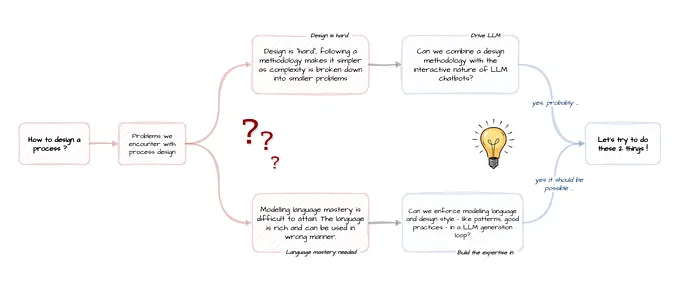
Mestro, the BPMN design assistant powered by LLM ### How to leverage agentic workflows and LLMs for interactive process modeling?
Sep 29, 2025
See all from Viacheslav Lushchinskiy
Recommended from Medium

Will Claude Design replace designers? ### It’s complicated, but very simple.
6d ago


I Failed Uber’s System Design Interview Last Month. Here’s Every Question They Asked. ### It was much harder and the rejection email taught me more than any LeetCode grind ever could.
Feb 20

In
by
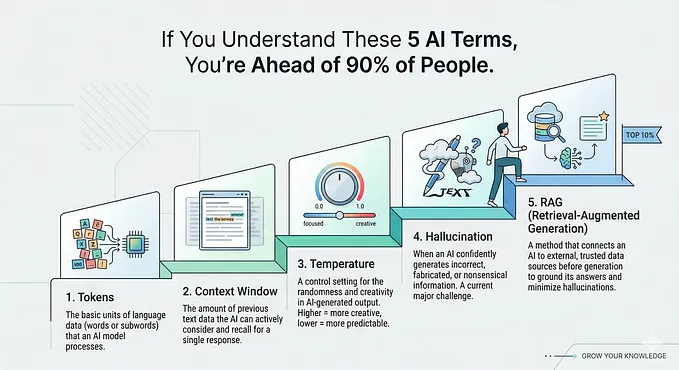
If You Understand These 5 AI Terms, You’re Ahead of 90% of People ### Master the core ideas behind AI without getting lost
Mar 29


In
by
What Claude Design actually changes for designers ### The handoff problem is finally getting solved — and it’s happening faster than most of us expected.
3d ago


In
by
Opus 4.7 Is The Worst Release Anthropic Has Ever Shipped. ### Adaptive thinking is on. Manual budgets are gone. Billing changed.
6d ago


In
by
As a Neuroscientist, I Quit These 5 Morning Habits That Destroy Your Brain ### Most people do #1 within 10 minutes of waking (and it sabotages your entire day)
Jan 14